Adventures in Form Handling – II

The next step was generating the query with DS Attributes. Nice thing about SQL is it doesn’t care about line breaks, so you can condense it down to one line. This is good as the XML engine in Delivery Server may not preserve these. I didn’t test conclusively, if you need white-space or formatting for say a REST call you will want to test thoroughly.

This is how I broke down the SQL to ‘templatize’ it for Delivery Server. Each line that needs Delivery Server variables is broken out.

DECLARE @formID as varchar(50) DECLARE @InsertOutputForm table (  form_id varchar(50) );DECLARE @InsertOutputFormFields table( id varchar(50), form_id  varchar(50), name  varchar(50),  type varchar(50)); INSERT INTO dbo.forms (name,type,dsuser) OUTPUT    INSERTED.id as form_id  INTO @InsertOutputForm
VALUES (N'partnerinfoform', N'form',N'cindy')
SET @formID=(SELECT form_id FROM @InsertOutputForm); INSERT INTO dbo.form_fields (form_id, name, type, data)OUTPUT INSERTED.id, INSERTED.form_id, INSERTED.name, INSERTED.type  INTO @InsertOutputFormFields VALUES
 (@formID, 'products', 'string', 'products'),
 (@formID, 'solutions', 'string', 'solutions'),
 (@formID, 'successes', 'string', 'successes'),
 (@formID, 'resources', 'string', 'resources'),
 (@formID, 'comments', 'string', 'test'),
 (@formID, 'submit', 'string', ''),
 (@formID, 'step', 'string', '430'),
 (@formID, 'skey', 'string', 'SID-04000407-1F158E8D')
;

Next prepare to drop it into a DS XML file with pseudo inline attribute syntax.

DECLARE @formID as varchar(50) DECLARE @InsertOutputForm table (  form_id varchar(50) );DECLARE @InsertOutputFormFields table( id varchar(50), form_id  varchar(50), name  varchar(50),  type varchar(50)); INSERT INTO dbo.forms (name,type,dsuser) OUTPUT    INSERTED.id as form_id  INTO @InsertOutputForm
VALUES (N'[#formname#partnerinfoform#]', N'[#formtype#form#]',N'[#rde-fields.user#]')
SET @formID=(SELECT form_id FROM @InsertOutputForm); INSERT INTO dbo.form_fields form_id, name, type, data)OUTPUT INSERTED.id, INSERTED.form_id, INSERTED.name, INSERTED.type  INTO @InsertOutputFormFields VALUES
 (@formID, '[#fieldname#]', '[#fieldtype#string#]', '[#data#]'),
;
<!-- Split Fields -->
		<rde-dm:attribute mode="write" attribute="request:ft.ssv.fields" value="[#request:_sf_form_fieldnames_#].substring(1)" value-separator="|" />
		<rde-dm:attribute mode="write" attribute="request:ft.query.segment1" value="DECLARE @formID as varchar(50) DECLARE @InsertOutputForm table (  form_id varchar(50) );DECLARE @InsertOutputFormFields table( id varchar(50), form_id  varchar(50), name  varchar(50),  type varchar(50)); INSERT INTO dbo.forms (name,type,dsuser) OUTPUT    INSERTED.id as form_id  INTO @InsertOutputForm " />
		<!-- replace pseudo code -->
		<rde-dm:attribute mode="write" attribute="request:ft.query.segment2" value="VALUES (N'[#request:_sf_form_name_#partnerinfoform#]', N'[#request:formtype#form#]',N'[#user:rde-fields.login#anonymous#]') "/>
		<rde-dm:attribute mode="write" attribute="request:ft.query.segment3" value="SET @formID=(SELECT form_id FROM @InsertOutputForm); INSERT INTO dbo.form_fields (form_id, name, type, data) OUTPUT INSERTED.id, INSERTED.form_id, INSERTED.name, INSERTED.type  INTO @InsertOutputFormFields VALUES " />

		<!-- Loop Over Fields -->
		<rde-dm:attribute mode="for-each" attribute="request:ft.ssv.fields" alias="field" tag="fields">
			<rde-dm:attribute mode="condition">
				<rde-dm:constraint>context:field NE ""</rde-dm:constraint>
				<field>
					<!-- Get Field Name -->
					<![CDATA[-]]><rde-dm:attribute mode="read" attribute="context:field"/><![CDATA[:]]><rde-dm:attribute mode="read" attribute="request:[#context:field#]" /><![CDATA[;<br/>]]>
					<rde-dm:attribute mode="write" attribute="request:ft.query.segment4" value="[#request:ft.query.segment4#], (@formID, '[#context:field#].replace(';',', ')', '[#fieldtype#string#]', '[#request:[#context:field#badField#]#].replace(';',', ')')"/>

					<rde-dm:attribute mode="write" attribute="request:rdb.columns" value="[#request:rdb.columns#], form_fields.[#context:field#]"/>
					<rde-dm:attribute mode="write" attribute="request:rdb.values" value="[#request:rdb.values#],&quot;[#request:[#context:field#badField#]#].replace(';',', ')&quot;"/>
				</field>
			</rde-dm:attribute>
		</rde-dm:attribute>

		<rde-dm:attribute mode="write" attribute="request:ft.rdb.formquery" value="[#request:ft.query.segment1#] [#request:ft.query.segment2#] [#request:ft.query.segment3#] [#request:ft.query.segment4#].trim().substring(1);" value-separator="" />
		<![CDATA[<br/>]]>
		<rde-dm:attribute mode="read" attribute="request:ft.rdb.formquery" /><![CDATA[<br/>]]>
		<!-- TODO:
			- sql query submit
			- validate
			- add date&time of submit
			- set campaign step code = true
			-
		-->
		<rde-dm:rdb mode="query" alias="otwsm_supplemental" sql="select count(*) as count from dbo.form_fields;"/><![CDATA[-pre count <br/>]]>
		<rde-dm:rdb mode="update" alias="otwsm_supplemental" sql="[#request:ft.rdb.formquery#]"/>
		<rde-dm:rdb mode="query" alias="otwsm_supplemental" sql="select count(*) as count from dbo.form_fields;"/><![CDATA[- post count<br/>]]>

Unfortunately I quickly learned I should have RTFM’d. I ran straight into a blocker.


Unexpected error occurs:This statement isn't allowed=DECLARE @formID as varchar(50) DECLARE @InsertOutputForm table ( form_id varchar(50) )

The RDB DynaMent limits the types of commands that can be executed. Thus I seemed out of luck. Except their is the statement mode which I don’t believe I’ve used before. It will let you run unrestricted SQL statements. If you are running simpler queries do use ‘query’ or ‘update’ to help prevent SQL Injection.

<!-- Split Fields -->
		<rde-dm:attribute mode="write" attribute="request:ft.ssv.fields" value="[#request:_sf_form_fieldnames_#].substring(1)" value-separator="|" />
		<rde-dm:attribute mode="write" attribute="request:ft.query.segment1" value="DECLARE @formID as varchar(50) DECLARE @InsertOutputForm table (  form_id varchar(50) );DECLARE @InsertOutputFormFields table( id varchar(50), form_id  varchar(50), name  varchar(50),  type varchar(50)); INSERT INTO dbo.forms (name,type,dsuser) OUTPUT    INSERTED.id as form_id  INTO @InsertOutputForm " />
		<!-- replace pseudo code -->
		<rde-dm:attribute mode="write" attribute="request:ft.query.segment2" value="VALUES (N'[#request:_sf_form_name_#partnerinfoform#]', N'[#request:formtype#form#]',N'[#user:rde-fields.login#anonymous#]') "/>
		<rde-dm:attribute mode="write" attribute="request:ft.query.segment3" value="SET @formID=(SELECT form_id FROM @InsertOutputForm); INSERT INTO dbo.form_fields (form_id, name, type, data) OUTPUT INSERTED.id, INSERTED.form_id, INSERTED.name, INSERTED.type  INTO @InsertOutputFormFields VALUES " />

		<!-- Loop Over Fields -->
		<rde-dm:attribute mode="for-each" attribute="request:ft.ssv.fields" alias="field" tag="fields">
			<rde-dm:attribute mode="condition">
				<rde-dm:constraint>context:field NE ""</rde-dm:constraint>
				<field>
					<!-- Get Field Name -->
					<![CDATA[-]]><rde-dm:attribute mode="read" attribute="context:field"/><![CDATA[:]]><rde-dm:attribute mode="read" attribute="request:[#context:field#]" /><![CDATA[;<br/>]]>
					<rde-dm:attribute mode="write" attribute="request:ft.query.segment4" value="[#request:ft.query.segment4#], (@formID, '[#context:field#].replace(';',', ')', '[#fieldtype#string#]', '[#request:[#context:field#badField#]#].replace(';',', ')')"/>

					<rde-dm:attribute mode="write" attribute="request:rdb.columns" value="[#request:rdb.columns#], form_fields.[#context:field#]"/>
					<rde-dm:attribute mode="write" attribute="request:rdb.values" value="[#request:rdb.values#],&quot;[#request:[#context:field#badField#]#].replace(';',', ')&quot;"/>
				</field>
			</rde-dm:attribute>
		</rde-dm:attribute>

		<rde-dm:attribute mode="write" attribute="request:ft.rdb.formquery" value="[#request:ft.query.segment1#] [#request:ft.query.segment2#] [#request:ft.query.segment3#] [#request:ft.query.segment4#].trim().substring(1);" value-separator="" />
		<![CDATA[<br/>]]>
		<rde-dm:attribute mode="read" attribute="request:ft.rdb.formquery" /><![CDATA[<br/>]]>

		<rde-dm:rdb mode="query" alias="otwsm_supplemental" sql="select count(*) as count from dbo.form_fields;"/><![CDATA[-pre count <br/>]]>
		<rde-dm:rdb mode="statement" alias="otwsm_supplemental" sql="[#request:ft.rdb.formquery#] SELECT id, form_id, name, type FROM @InsertOutputFormFields;"/>
		<rde-dm:rdb mode="query" alias="otwsm_supplemental" sql="select count(*) as count from dbo.form_fields;"/><![CDATA[- post count<br/>]]>
		<!-- TODO:
			- add date&time of submit
		-->
		<rde-dm:attribute mode="read" attribute="request:step" /><![CDATA[-step<br/>]]>
		<rde-dm:attribute mode="write" op="set" attribute="user:campaign.step[#request:step#]" value="true"/> Set to True
		<rde-dm:attribute mode="read" attribute="user:campaign.step[#request:step#]" /><![CDATA[-step<br/>]]>
	<rde-dm:attribute mode="condition">
		<rde-dm:constraint>(request:redirect-target NE '') AND (request:debug NE 'true')</rde-dm:constraint>
			Redirect Now!<!-- redirect somewhere -->
			<rde-dm:process mode="redirect" type="http" url="http://10.25.0.51/demo/en/partner.htm" >
				<rde-dm:include content="[#request:redirect-target#content/en/index.htm#]"/>
			</rde-dm:process>
	</rde-dm:attribute>

That is the working result of a form handler to work with the “universal” storage tables handling a SmartForm post.
Posted in DS, solex, SQL Server, WSM | Tagged , , , , , | Leave a comment

Adventures in Form Handling

In part this week I’m working on a form handling setup. I created a SmartForm and started about writing it’s input to DB via Delivery Server.  I decided to make a more generic handler. We have some tools around for processing (client side validation, server side validation, JCaptcha) but no universal storage mechanism at hand. Conceptually this same processing used in tandem with SmartForm, forms created by dragging and dropping from panels in SmartEdit, a template form, or an external or legacy form. I’ve decided to just store this in a couple of tables as it will allow flexibility to integrate with other applications later on.

Goal:

Create a Delivery Server form handler to store M forms with N form fields per form. (ok I don’t really expect it to scale unlimited)

DDL:

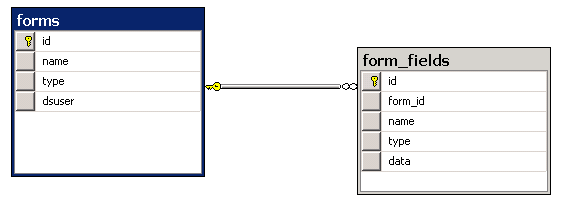
First I created some tables. here they are.

MS SQL 2008 DB Diagram

USE [otwsm_supplemental]
GO

/****** Object:  Table [dbo].[forms]    Script Date: 08/03/2011 09:24:40 ******/
SET ANSI_NULLS ON
GO

SET QUOTED_IDENTIFIER ON
GO

CREATE TABLE [dbo].[forms](
	[id] [uniqueidentifier] ROWGUIDCOL  NOT NULL,
	[name] [nvarchar](50) NOT NULL,
	[type] [nvarchar](50) NOT NULL,
	[dsuser] [nvarchar](50) NOT NULL,
 CONSTRAINT [PK_forms] PRIMARY KEY CLUSTERED
(
	[id] ASC
)WITH (PAD_INDEX  = OFF, STATISTICS_NORECOMPUTE  = OFF, IGNORE_DUP_KEY = OFF, ALLOW_ROW_LOCKS  = ON, ALLOW_PAGE_LOCKS  = ON) ON [PRIMARY]
) ON [PRIMARY]

GO

ALTER TABLE [dbo].[forms] ADD  CONSTRAINT [DF_forms_id]  DEFAULT (newid()) FOR [id]
GO

ALTER TABLE [dbo].[forms] ADD  CONSTRAINT [DF_forms_type]  DEFAULT (N'form') FOR [type]
GO

ALTER TABLE [dbo].[forms] ADD  CONSTRAINT [DF_forms_user]  DEFAULT (N'anonymous') FOR [dsuser]
GO

USE [otwsm_supplemental]
GO

/****** Object:  Table [dbo].[form_fields]    Script Date: 08/03/2011 09:24:27 ******/
SET ANSI_NULLS ON
GO

SET QUOTED_IDENTIFIER ON
GO

CREATE TABLE [dbo].[form_fields](
	[id] [uniqueidentifier] NOT NULL,
	[form_id] [uniqueidentifier] NOT NULL,
	[name] [nvarchar](50) NULL,
	[type] [nvarchar](50) NULL,
	[data] [nvarchar](max) NULL,
 CONSTRAINT [PK_form_fields] PRIMARY KEY CLUSTERED
(
	[id] ASC
)WITH (PAD_INDEX  = OFF, STATISTICS_NORECOMPUTE  = OFF, IGNORE_DUP_KEY = OFF, ALLOW_ROW_LOCKS  = ON, ALLOW_PAGE_LOCKS  = ON) ON [PRIMARY]
) ON [PRIMARY]

GO

ALTER TABLE [dbo].[form_fields]  WITH CHECK ADD  CONSTRAINT [FK_form_fields_forms] FOREIGN KEY([form_id])
REFERENCES [dbo].[forms] ([id])
GO

ALTER TABLE [dbo].[form_fields] CHECK CONSTRAINT [FK_form_fields_forms]
GO

ALTER TABLE [dbo].[form_fields] ADD  CONSTRAINT [DF_form_fields_id]  DEFAULT (newid()) FOR [id]
GO

ALTER TABLE [dbo].[form_fields] ADD  CONSTRAINT [DF_form_fields_type]  DEFAULT (N'string') FOR [type]
GO

SQL:

I decided I wanted to insert from a form post with one interaction between DS and SQL.  For now I decided not to make a prepared statement even though they are supported in v10.1.

(If there are better ways to do the insert let me know in the comments)

DECLARE @formID as varchar(50)
DECLARE @InsertOutputForm table

(

  form_id varchar(50)

);

DECLARE @InsertOutputFormFields table

(

  id varchar(50),
  form_id  varchar(50),
  name  varchar(50),
  type varchar(50)

);

INSERT INTO dbo.forms (name,type,dsuser)

OUTPUT

    INSERTED.id as form_id

  INTO @InsertOutputForm

VALUES (N'test', N'partnerinfoform',N'cindy')

SET @formID=(SELECT form_id FROM @InsertOutputForm);

INSERT INTO dbo.form_fields (form_id, name, type, data)

OUTPUT

    INSERTED.id, INSERTED.form_id, INSERTED.name, INSERTED.type

  INTO @InsertOutputFormFields

 VALUES (@formID, 'products', 'string', 'products'),
(@formID, 'solutions', 'string', 'solutions'),
(@formID, 'successes', 'string', 'successes'),
(@formID, 'resources', 'string', 'resources'),
(@formID, 'comments', 'string', 'test'),
(@formID, 'submit', 'string', ''),
(@formID, 'step', 'string', '430'),
(@formID, 'skey', 'string', 'SID-04000407-1F158E8D');

SELECT id, form_id, name, type FROM @InsertOutputFormFields;

RESULTS:

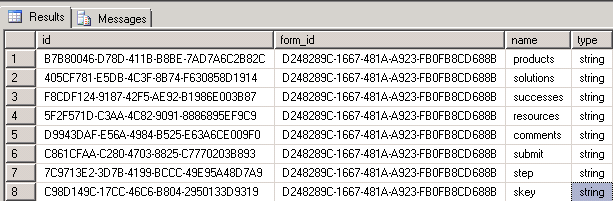
After struggles with getting to know the output clause and the proper variable syntax I finally got MS SQL 2008 to do all the work.

MS SQL 2008 result set

Query Result

Next step. Writing finishing DS page logic to format the query.


Posted in DS, Microsoft, solex, SQL Server, WSM | Tagged , , , , , , | 1 Comment

DS API and RQL via AJAX – A Test Drive

Recently in the community I’ve been advocating and drumming up support for DS REST API and Jian, Kim, and Manuel have been discussing MS Plugins using AJAX to call RQL. I recently got an opportunity to give them a test drive to see how they will work for rapid prototyping a solution for a Proof of Concept (POC). I was impressed.

The scenario (as originally understood):

To create a set of JSP pages that provide access to WSM

1)DS to display different contents based on date range, resolution, and later an audience category for personalization.

2) Remote access to Asset Manager contents, and on selection return relative paths for where published files would reside.

DS REST API In Depth:

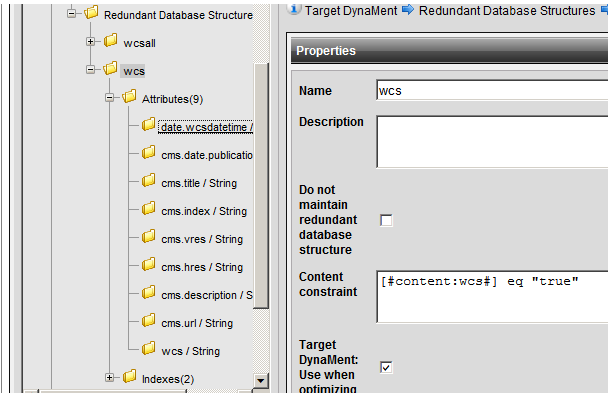
After installing (used the quick start guide for backup) and testing base functionality. I jumped back to Management Server to create contents with metadata to drive the searches. Some assigned by categories and keywords, some by standard fields, and some embedded in the content class templates. After publishing I created a redundant database structure.

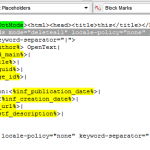
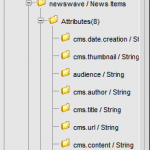
Screen capture of attributes and constraint

I created a new handler by copying the existing Target DynaMent handler. I removed authentication for the handler, as this is a POC it just make things simpler. I developed a query to the  specified my parameters.

http://host/api/1/newtarget.html?dbs=wcs&project=demo&include-mode=content,content&chunksize=1&chunk=1&sortedby=cms.date.wcsdatetime&ignore-constraints=completely&sortorder=desc&attributepath=none&constrainttime=20110623&hres=300

I added a couple DynaMents to write constraints for me based on values of ‘constrainttime’ and ‘hres’. And I had a single content returned per date/resolution. I finished it up by adding a simple HTML XSLT so the content of this one item is accessible as if it were called directly. The rest was some JSP to scrape characters from a URL into a StringBuffer. Much more sophisticated option is possible but it is a POC.

RQL via AJAX

var loginguid=”";
var sessionguid=”";$(document).ready(function() {// hide search result area
$(“#searchresult”).hide();
if($.cookie(“assetlogin”) == null || $.cookie(“assetsession”) == null || $.cookie(“assetlogin”) == “” || $.cookie(“assetsession”) == “”)
{
login();
}else{
if(“<%= session(“sessionkey”) %>” ==”" || “<%= session(“loginguid”) %>”==”"){
loginguid=$.cookie(“assetlogin”);
sessionguid=$.cookie(“assetsession”);
DisplayAssets(“FE46C4F25F4847F4A983C6F41EDC42A3″);
}else{
//alert(“asp vars”);
loginguid=”<%= session(“loginguid”) %>”;
sessionguid=”<%= session(“sessionkey”) %>”;
DisplayAssets(“FE46C4F25F4847F4A983C6F41EDC42A3″);
}
}
});


function DisplayAssets(FolderGuid)
{
if(FolderGuid == “”)
{
$(“#searchresult .content”).append(“<div class=\”error\”>Error</div>”);
return;
}


$(“#searchresult .content”).empty();


//load simple page info
var strRQLXML = padRQLXML(“<MEDIA><FOLDER guid=\”"+FolderGuid+ “\” subdirguid=\”"+FolderGuid+”\”><FILES action=\”list\” view=\”list\” sectioncount=\”-1\” maxfilesize=\”0\” attributeguid=\”\” searchtext=\”*\” pattern=\”\” startcount=\”1\” orderby=\”name\”/></FOLDER></MEDIA>”);
$.post(“/CMS/PlugIns/RemoteAssetManager/rqlaction.asp”, { rqlxml: strRQLXML },
function(data){
// add stuff to search results
if($(data).find(“FILE”).attr(“name”) != null)
{
//add on click alert http://host/saq/images/imagename
$(data).find(‘FILE’).each(function(){
$(“#searchresult .content”).append(“<div style=\”border: 2px solid grey; padding 15px;\”><a onclick=\”alert(‘URL for Integration Externally: http://host/url/images/”+$(this).attr(“name”)+”‘)\” href=\”#img=” + $(this).attr(“name”) + “\”><br/><img style=\”border:3px solid black;\” src=\”http://win-kk55dom76sa/cms/”+$(this).attr(“thumbnailpath”)+”\” /><br/>” + $(this).attr(“name”) + “</a><br/> </div>”);
});
}
else
{
$(“#searchresult .content”).append(“<div class=\”error\”>Folder with guid ” + FolderGuid + ” not found.</div>”);
}
$(“#searchresult”).show();
}, “xml”);
}


function login(){
// login
var strLoginRQLXML = “<IODATA> <ADMINISTRATION action=\”login\” name=\”admin\” password=\”dontdothis\”/></IODATA>”;
$.post(“/CMS/PlugIns/RemoteAssetManager/rqlaction.asp”, { rqlxml: strLoginRQLXML },
function(data){
//handle the login request
loginguid=$(data).find(‘LOGIN’).attr(“loginguid”);
userguid=$(data).find(‘LOGIN’).attr(“userguid”);
//sessionguid=$(data).find(‘LOGIN’).attr(“guid”);
$.cookie(“assetlogin”, loginguid);
//alert(“loginguid: “+loginguid);
//”<IODATA loginguid=\”<%= session(“loginguid”) %>\” sessionkey=\”<%= session(“sessionkey”) %>\”>” + innerRQLXML + “</IODATA>”;
var strProjectRQLXML = padRQLXMLNoSession(“<ADMINISTRATION action=\”validate\”><PROJECT guid=\”0B7FE095D7814EE48B95B2E2A41A0BA0\” /></ADMINISTRATION>”);
//alert(strProjectRQLXML);
$.post(“/CMS/PlugIns/RemoteAssetManager/rqlaction.asp”, { rqlxml: strProjectRQLXML },
function(data){
//handle the login request
sessionguid=$(data).find(‘SERVER’).attr(“key”);
$.cookie(“assetsession”, sessionguid);
DisplayAssets(“FE46C4F25F4847F4A973C6F41EDC42A3″);
}, “xml”);
return “”;
}, “xml”);
return “”;
}


function padRQLXML(innerRQLXML)
{
return “<IODATA loginguid=\”"+loginguid+”\” sessionkey=\”"+sessionguid+”\”>” + innerRQLXML + “</IODATA>”;
}
function padRQLXMLNoSession(innerRQLXML)
{
return “<IODATA loginguid=\”"+loginguid+”\”>” + innerRQLXML + “</IODATA>”;
}

This made a quick and easy UI to include via a similar JSP to the ones used for Delivery Server. This could be expanded on by

Result:

Both satisfied the technical requirements as they were understood. Some on the fly reconfiguration during a break was able to more accurately meet the customers requirements.

Time Frame:

Total time <16 hrs

Facts:
This includes download, install, configuration of REST project. A good amount of this time was spent coding the JSP to include the results of my REST services. I will be honest I’m really a novice with limited hands on experience. Only some rusty revision of existing RQL scripting as background and an existing AJAX plugin as guide.


Posted in DS, MS, solex, WSM | Tagged , , , , , | 3 Comments

WAR Deploy of OT WSM Delivery Server on vFabric tc Server

Here is a quick log of an experiment. vFabric tc Server is a Tomcat clone “Enterprise”-ified by the SpringSource now VMWare folks. It has hooks setup into their Hyperic Analysis tool that I’ve been meaning to look at for a while.

  1. Install tc Server – pretty easy with 60 day demo.
  2. Download and extract DS 10.1 SP1 (pre-patched) from OpenText KC
  3. Download and extract SQL JDBC 1.2
  4. Make sure you have a working SQL 2008 DB up and running. Make sure you create database users. For dev I always make sure to use SQL mixed mode as its much quicker to provision new users.
  5. Make sure you have license keys needed for install
  6. Kick off DS setup for 64-bit
  7. Pick Web Archive (.war) deployment
  8. Select region (America/Australia)
  9. Next+Next
  10. Import license XML file (ah so much better than old copy and paste)
  11. Set target path (not the actual tc Server webapps yet)
  12. Next-Next-Next-Next-Next
  13. Set administrative user and pwd
  14. Pick your 1.2 sqljdbc.jar
  15. Enter credentials. If using a named instance with SQL Server edit the url and remove the :<%port%> host\instance;
  16. allow network access (if applicable)
  17. Use default db names or rename to hearts desire
  18. Next Next
  19. Wait to make sure Delivery Server Prepartion Completes- Last line should read “Initialisation- insert licenses”
  20. Next (if no sample projects) Next Next
  21. Done. with WAR creation.
  22. Stop tc Server if running
  23. Next stops parallel but not directly follow the manual for deploying WAR file
  24. Copy jar files into vfabric-tc-server\myserver\lib
  25. Copy WAR file into vfabric-tc-server\myserver\webapps
  26. Update vfabric-tc-server\myserver\bin\setenv.bat. Here is what I set my last 2 lines to hybridizing some of the rdesetenv.bat optional settings with the tc Server defaults
    set JVM_OPTS=-Xmx512M -Xss192K -XX:MaxPermSize=128m
    set JAVA_OPTS=%JVM_OPTS% %AGENT_PATHS% %JAVA_AGENTS% %JAVA_LIBRARY_PATH%  -Duser.language=en -Djava.net.preferIPv4Stack=true -XX:+DisableExplicitGC -Dsun.rmi.dgc.client.gcInterval=3600000 -Dsun.rmi.dgc.server.gcInterval=3600000 -server -XX:+UseConcMarkSweepGC -XX:+CMSIncrementalMode -XX:+UseParNewGC -XX:+CMSClassUnloadingEnabled -XX:+CMSPermGenSweepingEnabled
  27. Save and Start tc Server
  28. Login to <host>:<port>/cps/rde/iauth with your user and password.
  29. Do your own verification of functionality because this is as far as my experiment has gone thus far.

Enjoy.


Posted in DS, Java, solex, WebApp, WSM | Tagged , , | Leave a comment

YSlow Tuning

For you my visitor I have tuned my blog using YSlow. I’m up to a ‘B’ score. Sorry it still has a number of JavaScript and “cloud” features that keep it a heavy page for HTTP requests.

excerpt of .htaccess:
FileETag none

<IfModule mod_expires.c>
AddOutputFilterByType DEFLATE application/x-javascript text/html text/plain text/xml   text/javascript application/javascript text/css
BrowserMatch ^Mozilla/4 gzip-only-text/html
BrowserMatch ^Mozilla/4\.0[678] no-gzip
BrowserMatch \bMSIE !no-gzip !gzip-only-text/html
#css hack
<FilesMatch “\\.(css)$”>
SetOutputFilter DEFLATE
</FilesMatch>
</IfModule>

<IfModule mod_deflate.c>
SetOutputFilter DEFLATE

ExpiresActive On
ExpiresByType text/css “access plus 1 month 15 days 2 hours”
ExpiresByType application/javascript “access plus 1 month 15 days 2 hours”
ExpiresByType image/gif “access plus 1 month 15 days 2 hours”
ExpiresByType image/jpeg “access plus 1 month 15 days 2 hours”
ExpiresByType image/png “access plus 1 month 15 days 2 hours”
ExpiresByType image/x-icon “access plus 1 month 15 days 2 hours”
</IfModule>

Posted in Uncategorized | Tagged , , | Leave a comment

DS REST API

UPDATE: Shelly Mao has been very helpful in testing to point out gaps in documentation. This should help those interested setting up their own environments. Currently installing and configuring components for hosted development.

Making progress on the API. Two decent code updates in two weeks. Waiting for server provisioning to get new API environment so we can extend access to the community. Have 4-5 non-OT developers looking to help.

Posted in Uncategorized | Tagged , , , , | Leave a comment

Hello world!

Welcome to my blog. This is my first post on this blog and hope to update on a regular basis.

Posted in Uncategorized | Leave a comment

IntenseDebate

Activated this plugin came as a recommendation from my friend Katie Ett. Hope I like it.

Posted in Uncategorized | Tagged , , | Leave a comment